How to Instrument the EcoSense Module with Armor 4 and 4+
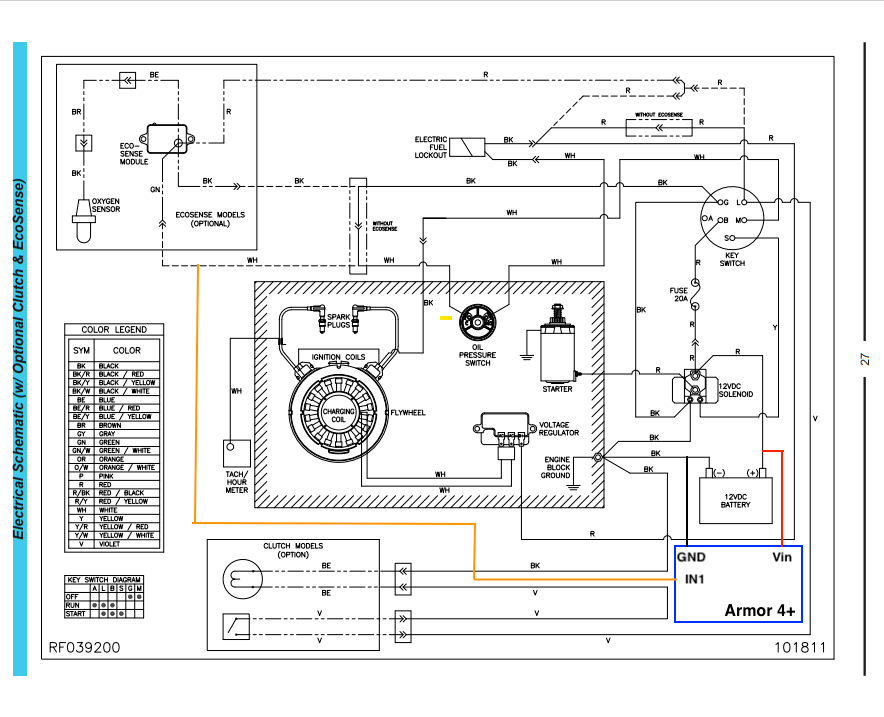
Follow the steps below to connect an Armor 4 or Armor 4+ device to equipment that uses an EcoSense module. Use the wiring schematic shown here as a reference during installation.
Tools Needed
- 10mm socket or Phillips head screwdriver
- Zip tie
- Wire cutters
- Wire strippers
Installation Steps
- Connect Armor to the equipment battery.
- Connect the red wire of the Armor wire harness to the positive (+) battery terminal. Ensure the fuse remains in the circuit for safety.
- Connect the black wire of the Armor wire harness to the negative (−) battery terminal.
- Connect the orange wire of the Armor harness to the white wire between the EcoSense module and the oil pressure switch using a 3-way WAGO connector.
- Secure the Armor device to the machine handle or another stable location using a zip tie.
Important: Verify all wiring is secure and routed away from moving parts, heat sources, and pinch points before operating the machine.
Was this article helpful?
That’s Great!
Thank you for your feedback
Sorry! We couldn't be helpful
Thank you for your feedback
Feedback sent
We appreciate your effort and will try to fix the article